CritiCall Multitasking Test: How the 15-Second Messages Work and How to Practice
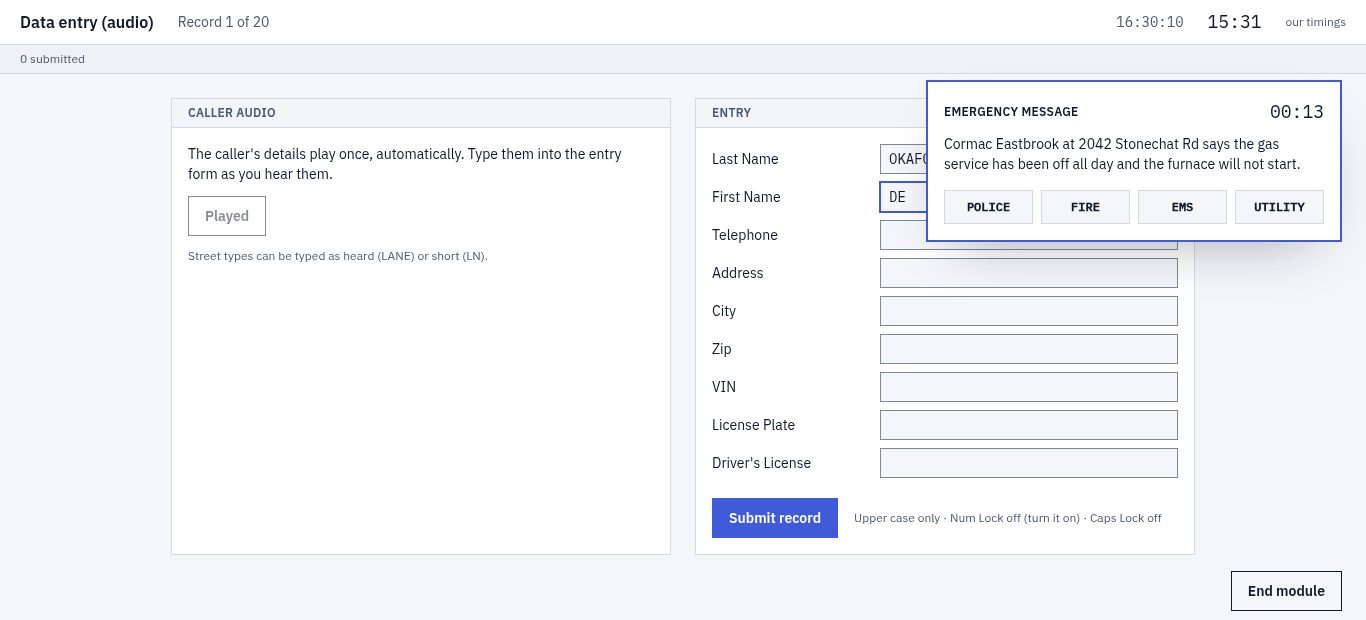
On the CritiCall multitasking test, emergency messages appear on your screen while you're busy with another task, such as typing records into a form, and you get 15 seconds to send each one to Police, Fire, EMS or Utility. A wrong agency or a late answer earns no credit. That comes straight from Biddle Consulting Group's candidate guide, and it's the part of CritiCall you can't rehearse on paper.
Rehearse it here: the free run is audio data entry with emergency messages, scored, on the same 15-second clock.
Free account. Runs need a computer with a keyboard and headphones.
What the CritiCall multitasking module is
Biddle calls it Multi-Tasking / Advanced Decision Making and sums it up in two lines: it "Requires decision making while simultaneously performing other tasks," and "Limited response time recreates the dispatching environment."
Agencies label it their own way. Scottsdale's whole battery is three modules, Decision Making, Data Entry Multi-Tasking and Data Entry Multi-Tasking (Audio), in 50 minutes. RCMP Alberta lists multitasking and decision making as two separate modules among its eight. Newton and Cambridge list Decision Making. Go by the module names in your invitation.
How the emergency-message overlay works
The messages ride on top of something else:
- Written data entry. The record sits on one part of the screen and the blank fields on another. You copy it across, field by field, in capitals, and a message cuts in.
- Audio data entry. A voice reads the record, first in the order of the fields on screen, later out of order, to mimic a caller giving details in fragments. Messages still cut in.
- Call summarization. Biddle's multitasking versions add emergency-response items while you listen to a call and key in what you hear. In one, the score blends the data you entered, the messages and the multiple-choice answers.
In the data-entry modules, each message is text on the screen. You answer with a single click on one of the four agencies, and you decide using only the rules the test gives you, not what you know about agencies in your own town.
How many messages a module holds, and how far apart they come, isn't published anywhere we looked.
How our multitasking practice works
- Biddle's limits. Four buttons, 15 seconds per message, and no credit for a wrong or late answer. A countdown shows the seconds left.
- Our rule card, one click away. The rules are ours, in our own words. Biddle's candidate guide has its own; read them before test day, because on test day the rules on your screen are the only ones that count. Our card also settles messages that fit two rules: Fire first, then Police, then EMS, then Utility.
- Our rate. Messages arrive one at a time, at a rate we set, because Biddle publishes none. The free run uses the same rate as the paid drills.
- Our messages. Every one was written for our card, then solved blind against it before it went into the bank.
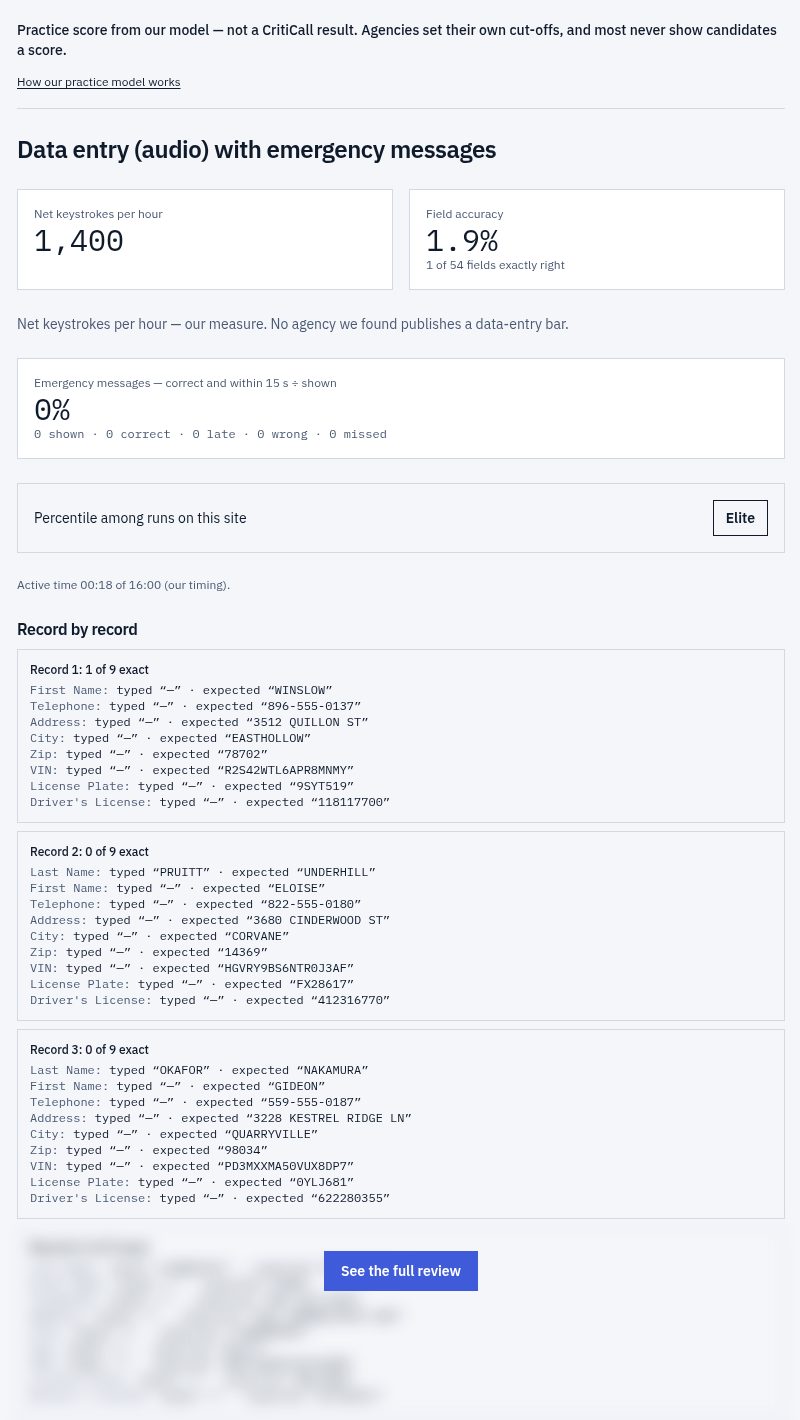
- A score that separates your misses. Correct-and-in-time answers count against messages shown; wrong and late answers are listed apart. No agency we found publishes a separate bar for emergency messages, so your band uses the 70–80% range agencies publish, and the results screen says so.
The free run puts the messages over audio data entry. With Starter you can switch them on or off over the written and audio data-entry drills, and call summarization has a multitasking version too.
Why the CritiCall multitasking test is hard
Experience isn't the barrier: Biddle says applicants "need no prior dispatch experience or special dispatcher training to succeed." The rules are short. The load is the clock plus the task underneath, and Biddle's instructions point at three ways that load costs points:
- Answering from habit instead of the rules. The test grades you on its rule set, not on instinct.
- Running out the 15 seconds while you finish a field.
- Changing an answer by accident. Answers are single clicks, and a click on another option replaces your answer.
And the task underneath still wants every value "in the proper location on the screen."
Writing our message bank showed us where habit bites. Three new messages, keyed under our card:
- "A tenant at 31 Wren Street says her whole apartment smells of gas. No smoke, no flames." Habit says Fire. Our card says Utility: a gas smell is a utility problem, and with no smoke, flames or injury, no higher rule applies.
- "A boy's hand is stuck in a storm-drain grate on Tolliver Road. He isn't hurt; he just can't pull it free." Habit says EMS. Our card says Fire: someone stuck who must be freed, whatever the cause.
- "A man is punching a stranger outside the bowling alley, and the stranger's nose is bleeding." Habit says EMS again. Our card says Police: someone hurt on purpose, even when they need medical help.
On test day the rules will be worded differently, and the same message could land somewhere else. The skill transfers. The answers don't.
How to practice for the CritiCall multitasking test
- Learn the rules before the clock starts. On CritiCall, each section opens with optional practice items that don't count, and Newton and Cambridge say they're untimed. Use them to read the rule set you'll be graded on.
- Make the task underneath automatic. Drill data entry alone first: Tab order, capitals, and Num Lock on, as Biddle suggests. Then switch the messages on.
- Answer, then go back. When a message lands, decide, click once, and return to the field. The field will wait. The 15 seconds won't.
- Practice with sound. RCMP Alberta and Palo Alto send a link and you test on your own computer, with your own headphones or speakers. Practice on that setup.
- Practice at length. Scottsdale gives its three modules 50 minutes. Our data-entry multitasking runs last 16 minutes: our timing, set from the session lengths agencies publish, since Biddle publishes none per module.
- Sort your misses. A late answer is a pacing problem; a wrong one is a rules problem.
What the free multitasking run includes
One full run, free with an account: audio data entry with emergency messages, 16 minutes on our clock. You see net keystrokes per hour (our measure) and field accuracy for the records, plus your message tally: correct, wrong, late and missed. Part of the item-by-item review stays locked, and your percentile opens on Elite once 30 completed runs exist.
After that, Starter is $39 USD and opens every module of our CritiCall practice test as a drill. Elite is $69 USD and adds full timed batteries. Both are one-time payments with 12 months of access and a 7-day money-back guarantee. what Starter and Elite include
One free run per account.
CritiCall multitasking test FAQ
How long do you get for each CritiCall emergency message?
15 seconds. A wrong agency, or any answer after the limit, earns no credit.
Are your rules the same as the ones on the CritiCall test?
No. Ours are written by us. The format matches what Biddle's guide describes: four agencies, 15 seconds, a task running underneath. On test day, you answer by the rules on your screen.
Can I practice the CritiCall multitasking test for free?
Yes. One full run of audio data entry with emergency messages is free with an account; the free typing test needs no account.
Written by the Pass911 team. Biddle's module descriptions and the agency module lists checked against their own pages on October 23, 2026. Our scoring method